In the previous post, we looked at a WordPress backdoor that had been pasted into a theme’s functions.php file after the closing PHP tag. The malware wanted to create a hidden administrator account, hide it from the user list, manipulate user counters, block deletion, and generally behave like a small goblin with administrator rights.
The funny part was that it failed to execute because it had been inserted after ?>.
The less funny part is that something still managed to write to the theme file.
That is the real story.
Malware in functions.php is rarely the start of an incident. It is usually the footprint left after the attacker has already crossed a more important boundary. By the time malicious PHP appears in a theme file, the attacker has usually gained one of three things: access to WordPress administration, access to the filesystem, or the ability to make WordPress itself write a file on their behalf.
The first one is obvious. If someone steals or guesses an administrator password, and the built-in theme/plugin editor is enabled, they can simply log in, open the Theme File Editor, select functions.php, paste their little masterpiece, and call it a day. That is boring, but common. It is also why DISALLOW_FILE_EDIT should be set on serious sites.
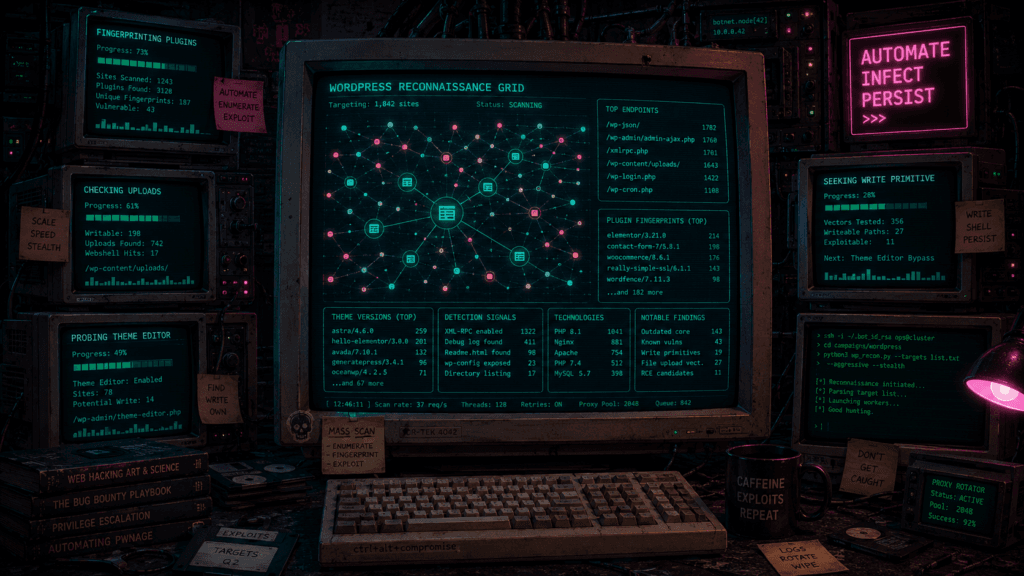
But most large-scale WordPress infections are not one hoodie-wearing villain manually editing files one site at a time. They are automated. Bots scan the internet for vulnerable plugins, old themes, exposed admin endpoints, bad upload handlers, writable directories, backup tools, importers, page builders, and anything else that can be turned into a file write or code execution primitive.
The bot does not care about your brand. It does not care about your blog. It does not care that the site is “just a small local club page.” It sees a WordPress installation, fingerprints the components, checks known exploit patterns, and if something responds in the right way, it starts writing.
Your functions.php file is not the target because it is special.
It is the target because it is convenient.
Why functions.php Is Such a Cozy Place for Malware
The active theme’s functions.php file is automatically loaded by WordPress. It runs in a WordPress context, which means code inside it has access to WordPress functions, the database abstraction layer, hooks, filters, options, users, roles, and the rest of the machinery.
For legitimate developers, this is useful.
For attackers, this is Christmas.
A few lines in functions.php can create a new administrator user, inject JavaScript into page output, redirect visitors, hide admin notices, register cron jobs, add rewrite rules, phone home to a command server, or silently recreate malware after it has been removed.
It also blends in. Most real-world functions.php files are already messy. They contain theme setup, enqueue logic, shortcodes, plugin compatibility hacks, SEO tweaks, WooCommerce glue, snippets copied from blog posts, and that one “temporary” fix from 2017 which nobody dares delete because it might be holding the entire website together with duct tape and vibes.
So when malware lands there, it does not always stand out immediately.
Attackers know this. Automated malware knows this. Security scanners know this too, which is why mature malware often avoids obvious strings, hides payloads in encoded blobs, splits code across options and files, or uses functions.php only as a loader for something stored elsewhere.
But even simple infections still love this file because it is loaded reliably.
A web shell hidden in uploads/2021/03/cache.php only runs when requested. A malicious snippet in functions.php runs whenever WordPress loads the theme.
That makes it a persistence point.
The Obvious Door: Admin Credentials
Let us get the obvious path out of the way first.
Sometimes attackers get into functions.php because they log in as an administrator.
That can happen through password reuse, credential stuffing, phishing, stolen browser sessions, compromised email accounts, old freelancer users, weak passwords, or exposed staging sites with terrible credentials. Once inside wp-admin, an attacker may be able to edit theme files directly if the dashboard file editor is enabled.
From the attacker’s perspective, this is delightful. The WordPress dashboard becomes a code deployment tool.
They do not need FTP.
They do not need shell.
They do not need a plugin exploit.
They just need an admin session and a site that still allows PHP editing from the backend.
This is why this line belongs in wp-config.php on almost every production WordPress site:
define( 'DISALLOW_FILE_EDIT', true );That does not make administrator compromise harmless. An admin account is still powerful. An attacker may still install plugins, change settings, create users, inject content, or abuse plugin features. But disabling file editing removes the most direct “paste PHP into the active theme” route.
Think of it as taking away the loaded nail gun. The attacker may still have a toolbox, but at least you have removed the tool most likely to put holes in the walls immediately.
Now for the more interesting part.
The Automated Infection Chain
Most commodity WordPress malware does not begin with someone browsing around your admin panel. It begins with scanning.
The internet is continuously scanned by bots looking for known patterns. WordPress is easy to fingerprint. The default paths are predictable. Plugin and theme assets often reveal versions. Public files leak component names. HTML comments, CSS paths, JavaScript URLs, REST responses, readme files, and static assets all become little breadcrumbs.
A bot may request paths like these:
/wp-content/plugins/some-plugin/readme.txt
/wp-content/themes/some-theme/style.css
/wp-json/
/wp-admin/admin-ajax.php
/xmlrpc.php
/wp-content/uploads/It is not “hacking” in the dramatic sense. It is inventory.
The bot wants to know what you are running.
Once it has a fingerprint, it compares that against a list of known vulnerabilities. That list might include an unauthenticated file upload in a plugin, an AJAX action missing a capability check, a theme importer that trusts remote files, a backup plugin that allows archive extraction, or a page builder endpoint that can be abused to write templates.
Then the infection process becomes very mechanical.
First, the bot confirms that the target exists and the vulnerable component is present. Then it sends a small test request. If the response looks vulnerable, it sends the real payload. The payload may create a file, modify an option, upload a plugin, create an admin user, inject a loader, or install a web shell. Finally, the bot verifies success by requesting the new file, checking for a marker string, logging in with a newly created account, or calling a callback URL.
That last part matters. Malware campaigns are not just throwing code into the void. They often include verification logic. “Did the shell upload?” “Does the admin user exist?” “Can I execute this command?” “Did the redirect stick?” “Can I write to the theme?”
The broken malware from the previous post had a cookie-based verification check:
if (isset($_COOKIE['WP_ADMIN_USER']) && username_exists($args['user_login'])) {
    die('WP ADMIN USER EXISTS');
}That is the same idea in miniature. The attacker wants a cheap way to ask the infected site: “Are you still mine?”
The Critical Primitive: File Write
When we talk about malware modifying functions.php, the key technical question is not “how did it know the file exists?” That part is easy.
The key question is: how did it get a write primitive?
A write primitive means the attacker has found some mechanism that lets them write bytes to the server’s filesystem. It does not necessarily mean they have full shell access. It might be narrower than that. But if the write lands in a place where PHP executes, the game changes.
There are several common ways this happens.
One is arbitrary file upload. A vulnerable plugin allows a user, sometimes even an unauthenticated visitor, to upload a file. The plugin intends to accept images, documents, imports, backups, or theme assets, but fails to properly restrict file type, extension, path, or permissions. The attacker uploads PHP instead of an image. If the file is placed somewhere executable, they now have a web shell.
Another is arbitrary file write. This is more direct. A plugin or theme takes user-controlled content and writes it to a path that the attacker can influence. Maybe it is saving CSS. Maybe it is exporting a template. Maybe it is writing a cache file. Maybe it is restoring a backup. If the attacker can control both the contents and the destination, they may write directly to functions.php or create a new executable PHP file.
A third route is archive extraction. Backup, migration, import, and theme installer plugins often handle zip files. If extraction is not carefully restricted, an attacker may use path traversal tricks or malicious archive structures to place files outside the intended directory. This can turn “upload this harmless import package” into “write PHP into the theme directory.”
A fourth route is authenticated low-privilege abuse. Many plugin vulnerabilities require a logged-in user, but not necessarily an administrator. A subscriber, customer, shop manager, contributor, or compromised low-privilege account may be enough if the plugin fails to check capabilities properly. WordPress has a strong roles and capabilities system, but plugin code must actually use it correctly. Attackers love endpoints that check “is the user logged in?” when they should check “is the user allowed to manage options, upload files, or edit themes?”
A fifth route is remote code execution. If the attacker can execute PHP through a vulnerable plugin, even briefly, they can then use normal PHP filesystem functions to modify files, assuming permissions allow it.
From a defender’s perspective, these are different vulnerabilities.
From the malware’s perspective, they are all just ways to get bytes onto disk.
A Typical Automated functions.php Infection
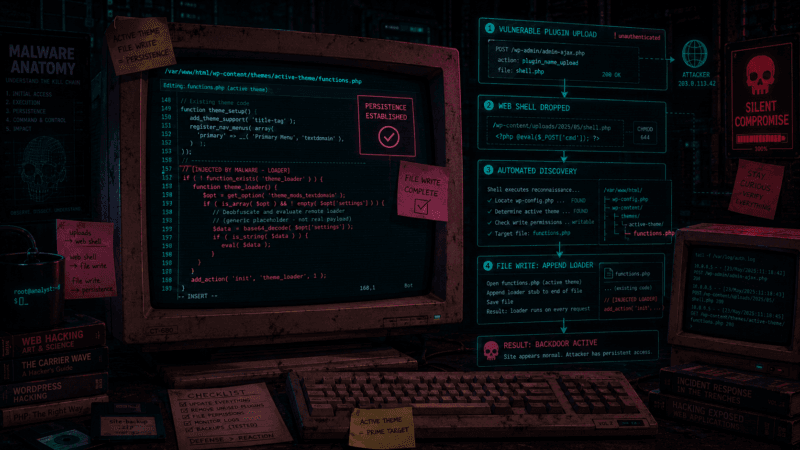
A simplified automated infection flow might look like this.
The bot finds a vulnerable plugin that allows unauthenticated file upload. It uploads a small PHP shell into a predictable path under wp-content/uploads/. It then requests that shell with a command telling it to locate WordPress.
The shell looks for wp-config.php by walking up directories. Once it finds that, it knows where WordPress lives. It can read database credentials, infer paths, and locate wp-content/themes/.
Then it determines the active theme. There are several ways to do this. It can parse the database options table for template and stylesheet. It can inspect front-end HTML for theme asset paths. Or it can simply infect every theme it can write to, because subtlety is optional when you are running at scale.
Once it finds a candidate functions.php, the malware checks whether it is writable.
A crude version of that logic, expressed as defensive pseudocode rather than a working payload, looks like this:
find WordPress root
find active theme directory
target = active_theme + "/functions.php"

if target exists and is writable:
    read current contents
    if marker is not already present:
append malicious loaderThe “marker” is important. Automated malware usually wants to avoid inserting the same payload repeatedly. Without a marker check, every page load or reinfection pass could append another copy, eventually breaking the file or making the infection obvious.
So malware often includes comments, hashes, option names, function names, or weird strings it can search for before reinserting itself. Sometimes the marker is obvious. Sometimes it is disguised as a cache key or license flag.
A simple malicious append might look structurally like this:
/* legitimate theme code above */

/* malware marker */
add_action('wp_footer', 'some_innocent_looking_function');
function some_innocent_looking_function() {
    // inject script, load remote payload, or run persistence logic
}More cautious malware may prepend code instead of appending it. Some malware tries to insert before the closing ?>. Some avoids the closing tag problem by reopening PHP. Some does not touch functions.php directly at all and instead drops a loader into mu-plugins, because must-use plugins load automatically and are less visible in the normal plugin interface.
The sample from the previous post failed because the insertion logic was dumb. It appended after the closing PHP tag without reopening PHP. That suggests a very simple automated routine: open file, append payload, done. It did not parse PHP. It did not check whether the file ended inside or outside PHP scope. It did not verify execution beyond perhaps checking whether the text appeared.
That is sloppy, but not rare. Large-scale malware does not need every infection to work. If it scans ten thousand sites and breaks half its attempts, the remaining half may still be profitable.
Commodity malware is not elegant. It is statistical.
Why Write Permissions Matter So Much
Whether an exploit can modify functions.php depends heavily on filesystem permissions.
On many WordPress installations, the web server user can write to parts of wp-content. That is necessary for uploads. It may also be allowed to write to plugins and themes so WordPress can update them through the dashboard.
This is convenient.
It is also dangerous.
If the PHP process running WordPress can write to theme files, then any vulnerability that reaches PHP execution may be able to modify theme files too. The vulnerable plugin does not need to have a “write to theme” feature. It only needs to give the attacker enough execution inside a process that already has write permissions.
That is a subtle but important point.
When people ask “how can a plugin vulnerability modify my theme?”, the answer is often: because both run as the same filesystem user.
The server does not say:
“This code came from a plugin, so it may only write plugin files.”
It says:
“This PHP process runs as user www-data, and www-data can write to that file.”
That is it.
This is why permissions are a containment boundary. If application files are read-only to the web server user, many attacks become less persistent. The attacker may still exploit a plugin. They may still modify database content. They may still upload files to writable directories. But they cannot casually append PHP to the active theme unless they find another path.
The ideal model is that WordPress can write to uploads but not to application code during normal runtime. Updates happen through a controlled process: deployment, SFTP with proper credentials, managed host update systems, or temporary permission changes during maintenance.
The messy real-world model is that everything under wp-content is writable because otherwise the update button complains.
Attackers prefer the messy model.
Plugin Bugs That Become File Writes
The most interesting compromises often come from plugin features that were never meant to be dangerous.
Take a custom CSS feature. A plugin lets administrators save custom CSS, and it writes that CSS to a file for performance. That sounds reasonable. But if the endpoint lacks a capability check, a subscriber may be able to write the file. If the filename is user-controlled, the attacker may change it from custom.css to shell.php. If the directory executes PHP, that becomes code execution.
Or take an import/export feature. A plugin accepts a JSON configuration file and imports settings. If those settings include template content that later gets evaluated, rendered unsafely, or written into PHP templates, an attacker may chain the importer into execution.
Or take a backup restore feature. It accepts a zip archive and extracts it. If it does not prevent path traversal, the archive may contain entries like:
../../themes/active-theme/functions.phpA secure extractor rejects that. A bad extractor writes outside the intended directory.
Or take an image upload. The plugin checks whether the filename contains .jpg but does not verify the actual file type. The attacker uploads avatar.php.jpg or abuses server configuration where PHP execution is enabled for unexpected extensions. On a hardened server, this should fail. On a bad shared host from the swamp era, it may not.
Or take an AJAX endpoint. WordPress plugins often register AJAX actions through admin-ajax.php. There are two versions: one for authenticated users and one for unauthenticated users. A developer may correctly register the endpoint but forget to check a nonce or capability inside the handler. The endpoint then becomes callable by people who should not have access.
The difference between safe and catastrophic can be one missing line:
current_user_can('manage_options')or one missing nonce check.
This is why plugin vulnerabilities are so often about authorization rather than “classic” memory corruption. The code has the feature. The attacker just convinces it to perform the feature for the wrong person.
Malware Often Does Not Start by Touching functions.php
A common misconception is that the first malicious file modification must be the visible infected file. In reality, functions.php may be stage two or stage three. By the time you see that file has changed, the attacker may already have used a different foothold to prepare the ground.
A very typical infection might begin with something as small as an upload vulnerability. The attacker gets a tiny PHP shell onto the server, often somewhere under wp-content/uploads/, and then uses that shell to pull down a larger malware kit. That kit does not need to guess blindly. It can walk the directory tree until it finds wp-config.php, read enough of the local WordPress configuration to understand the installation, and then start making decisions based on what it finds.
From there, the malware may use the database credentials from wp-config.php to create a hidden administrator account, store configuration in an autoloaded option, or plant encoded payload data somewhere in the options table. If the active theme is writable, it may then modify functions.php so that the theme becomes a loader for that database-stored payload. If plugin directories are writable, it may create a fake plugin as a second foothold. If uploads allow execution, it may leave another shell there. If .htaccess is writable, it may add redirect rules so search engine visitors or mobile users are sent somewhere entirely different from normal visitors.
Eventually, the infection reports back to a command server or waits for a later request containing a specific cookie, parameter, or marker. To the site owner, the first visible symptom might be a weird redirect, a hidden admin user, a suspicious line in functions.php, or some strange spam injected into pages. But that symptom is not necessarily the source. It is often just one visible branch of a persistence tree.
That is why cleaning only the obvious file so often fails. You remove the suspicious line from functions.php, reload the site, and for a moment everything looks fine. Then the fake plugin, the hidden option, the cron hook, or the shell in uploads quietly writes it back. The malware was not removed. One of its output paths was trimmed.
A functions.php infection may therefore be a loader rather than the full payload. It may contain only enough code to read a WordPress option, decode stored data, call a remote URL, register a cron event, or include another file. The shorter the visible snippet, the more suspicious I get. Not because short code is bad, but because short malware often means the real logic is somewhere else.
The Database as a Staging Area
Automated WordPress malware often uses the database as storage.
That makes sense. The database is writable by WordPress. It survives theme updates. It is less likely to be manually inspected than files. Options can autoload. Transients can hide data behind boring names. Plugin settings can store serialized blobs that nobody wants to read by hand.
An attacker who can update arbitrary options may not immediately be able to write functions.php, but they may be able to change something that leads there. For example, they may enable registration, change default roles, modify plugin settings, inject malicious JavaScript into theme options, or alter paths used by a plugin’s file-writing feature.
If they can write to the database and create an administrator account, they may then use admin-level features to get file access.
If they can write an autoloaded option and already have a small loader in functions.php, they can move the real payload into the database. That way the file looks less suspicious.
The malware from the previous post stored the hidden admin user ID in an option named _pre_user_id. That is a simple example of database-backed persistence. More advanced malware may store encoded code, remote URLs, timestamps, command queues, or reinfection flags.
The WordPress options table is a wonderful place to hide things because it is already full of junk.
That is not meant as an insult. It is simply the natural lifecycle of a WordPress site. Install plugins. Remove plugins. Change themes. Add integrations. Disable features. Test things. Years pass. The options table becomes a junk drawer with SQL.
Attackers love junk drawers.
Why Malware Reinserts Itself
One of the more frustrating parts of WordPress cleanup is malware that comes back. This is not magic, even if it can feel that way when the same ugly snippet reappears after you have just deleted it. It is usually persistence.
Attackers know that site owners and automated scanners may delete suspicious files. So the malware often gives itself more than one place to live. A fake plugin may recreate the theme injection. The theme injection may recreate the fake plugin. A cron job may periodically restore both. A database option may store the actual payload while the file system contains only a tiny loader. A hidden administrator account may allow the attacker to return manually, and a web shell may sit under an innocent-looking filename waiting for the next command.
The reinfection logic is often crude, but it does not need to be elegant. On every page load, the malware may check whether a specific file still exists and recreate it if it has been removed. In the admin area, it may hide its own user account, suppress warnings, or alter plugin lists only when a real administrator is looking. Through WordPress cron, it may wake up every hour, call home, refresh payloads, or reinstall missing components. Some malware stays even quieter and activates only when a request contains a particular cookie, query parameter, or header. That way it avoids doing noisy work on every request and only wakes up when the operator knocks.
This is why a proper cleanup is not “remove the suspicious code from functions.php.” That is only the beginning. The real task is to find the mechanism that wrote it, the backup mechanism that can write it again, and the access path that allowed any of it to happen in the first place.
How an Automated Bot Decides What to Infect
Once malware has code execution, it often starts by learning the terrain. It wants to know where WordPress is installed, whether ABSPATH is defined, where wp-config.php lives, which theme is active, which directories are writable, whether plugin directories can be modified, whether uploads can execute PHP, what PHP version is available, which plugins are installed, what the database prefix looks like, and which server-side functions have been disabled.
That discovery phase is not glamorous, but it is what makes automated malware effective. The payload does not need human judgment if it has a reasonable set of fallbacks. If theme files are writable, it can infect functions.php. If plugin directories are writable, it can create a fake plugin. If mu-plugins exists, or can be created, it can drop a must-use plugin that loads automatically and is less visible in the normal plugin interface. If uploads allow PHP execution, it can leave a shell there. If the filesystem is mostly locked down but the database is writable, it can create an administrator user, inject options, or store a payload in autoloaded configuration. If .htaccess is writable, it can add redirect rules. If none of the nice persistence paths are available, it may simply inject spam into posts and move on to the next target.
This is why the same malware family can look slightly different across sites. On one installation, it appears in functions.php. On another, it appears as a fake plugin. On a third, it hides under wp-content/uploads/.cache/. On a fourth, the file system looks almost clean because most of the payload lives in the database. The malware adapts to what the environment allows, and the site owner sees only the branch of the infection tree that happened to grow successfully on that server.
What a Defender Should Look For
If malicious code appears in functions.php, do not stop at that file. Start by treating it as a timestamped clue. Look at what else changed around the same time. A plugin file modified within the same minute may be more important than the theme injection itself. A new PHP file under uploads may be the original shell. A changed .htaccess may explain redirects. A modified wp-config.php may indicate deeper access. A new directory under mu-plugins may be the actual persistence mechanism.
The user database deserves the same attention. Suspicious administrator accounts often use names that are just boring enough to be ignored: adm1n, support, system, wpadmin, backup, editor, or security. The email addresses may look generic, the creation dates may line up with the infection, and the account may not appear in the normal admin UI if the malware is hiding it.
The options table is another place where you should expect dirt. Look for recently changed options, unfamiliar autoloaded entries, encoded blobs, suspicious URLs, plugin settings that do not match installed plugins, and generic-looking names that seem designed to disappear into the noise. A compromised WordPress database can hold payloads, reinfection flags, hidden user IDs, command queues, and configuration for remote loaders.
The logs are where the infection timeline starts to become real. Around the first known modification time, web server logs may show POST requests to plugin endpoints, admin-ajax.php, REST API routes, upload handlers, theme importers, backup restore functions, or newly created PHP files. Authentication logs may reveal a wp-admin login shortly before the file changed, perhaps from an unusual IP address or from a user account that normally never touches the site. Hosting logs may show SFTP, FTP, SSH, file manager, or control panel access that bypassed WordPress entirely.
And do not forget sibling sites. If several WordPress installations live under the same hosting account, one abandoned staging copy can reinfect the main site. Attackers do not respect your folder naming scheme, your “old-backup” directory, or your belief that the test site from 2019 is irrelevant. If it is writable and reachable, it is part of the attack surface.
How to Reduce the Damage
There is no single fix, but there is a lot of boring work that actually helps. Start by disabling PHP editing from wp-admin with DISALLOW_FILE_EDIT, because the built-in editor turns a stolen admin session into an easy code-writing session. That one setting will not save a fully compromised site, but it removes one of the most convenient post-login paths to functions.php.
Administrator accounts should be treated as high-value keys, not casual publishing accounts. Use multi-factor authentication, remove old users, avoid shared logins, and be especially suspicious of accounts created for agencies, freelancers, tests, migrations, or “temporary” support access. Temporary accounts have a magical ability to become permanent security holes.
The plugin and theme surface needs regular pruning. Keeping WordPress core updated is necessary, but it is not enough if the site still carries abandoned plugins, unused themes, old page builders, forgotten importers, and mystery zip files from the discount malware buffet. Deactivate is not the same as remove. If code is no longer needed, delete it from the server.
The filesystem should also make persistence harder. Uploads need to be writable, but uploads should not execute PHP. Application code should not be writable by the web server during normal operation if your deployment model can support that. Controlled deployments, managed updates, or temporary write access during maintenance are much safer than leaving the whole application tree writable forever because the update button once complained.
File integrity monitoring is worth the noise if tuned properly. You want to know when functions.php, plugin files, wp-config.php, .htaccess, or anything under mu-plugins changes. Those files are not just content. They are execution paths.
After a compromise, rotate more than the WordPress password. Rotate hosting panel credentials, SFTP and SSH credentials, database passwords, deployment keys, API tokens, and the email accounts used for password resets. Many cleanups fail because the visible malware is removed while the attacker’s real access path remains open.
And perhaps most importantly, treat WordPress as software, not furniture. Furniture can sit in a corner for ten years and remain mostly furniture. Software left unattended for ten years becomes compost.
The Real Lesson
When malware appears in functions.php, the interesting question is not only what the malware does. It is how the attacker got enough leverage to put it there.
Sometimes the answer is simple: someone stole an administrator password, logged in, and used an enabled theme editor. That is the obvious route, and it is still depressingly common. But at scale, the path is often more automated and more mechanical. A bot fingerprints the site, identifies a vulnerable plugin or theme, exploits a missing capability check, upload bug, file write issue, or remote code execution flaw, then checks what the environment allows. If the active theme is writable, it modifies functions.php. If plugin directories are writable, it creates a fake plugin. If mu-plugins is available, it hides there. If uploads can execute PHP, it drops a shell. If the database is the easiest place to persist, it stores payloads, users, or configuration there.
Often it does more than one of those things, because malware authors understand redundancy. Unfortunately.
The broken backdoor from the previous post was funny because it forgot to be PHP. But the mistake should not make us too comfortable. The failed code was still evidence that the site had been writable by something that should not have been writing to it. That is the part worth losing sleep over.
A compromised functions.php is not just a dirty file. It is a sign that somewhere in your WordPress stack, a boundary failed. Maybe it was a password. Maybe it was a plugin. Maybe it was file permissions. Maybe it was a hosting account. Maybe it was an abandoned theme from the Pleistocene era of web design.
But something handed the attacker a pen.
And once they can write PHP into a place WordPress loads automatically, they are no longer visiting your website.
They are helping run it.
If you want to check your wordpress installation for uninvited visitors, then you can try my wp-scanner (previously wp-cleaner) tool and see if it finds something: https://github.com/kimusan/wp-cleaner