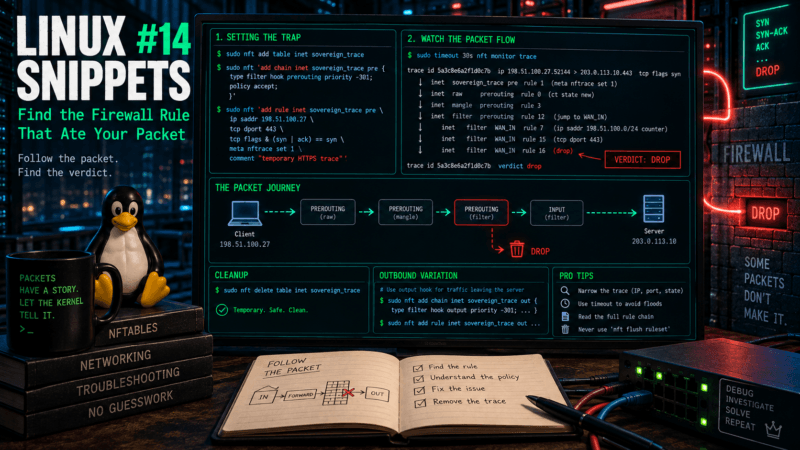
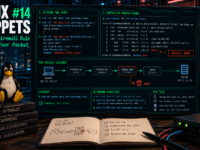
Introducing the “Sovereign Snippets” Series: Most of our time is spent in complex configurations, but the real power of a Linux system often hides in the short, punchy commands we use every day to maintain control over our hardware. I’m starting this series to document the specific “one-liners” I use to audit, secure, and manage my systems. No fluff – just functional tools for those who prefer the CLI over a GUI.
The Bureaucracy of Firewalls
A firewall rule set can be perfectly valid, beautifully formatted, and entirely responsible for breaking production.
When a connection fails, the traditional iptables debugging method involved adding increasingly desperate LOG targets throughout your chains, hoping to catch the packet before it disappeared. Modern Linux has moved to nftables, which brings a much more civilized, transaction-based approach to packet filtering. It also brings a phenomenal diagnostic tool: nftrace.
Instead of guessing where a packet is being dropped, you can tag a specific flow as it enters the network stack and watch it traverse the chains, jumps, and verdicts in real time.
Step 1: Setting the Trap
We do not want to mix our diagnostic tools with our production firewall rules. Instead, we create an entirely separate, temporary table specifically for this investigation.
Let’s say we want to trace new HTTPS connections arriving from a specific diagnostic client.
sudo nft add table inet sovereign_trace

sudo nft 'add chain inet sovereign_trace pre {
  type filter hook prerouting priority -301;
  policy accept;
}'Why priority -301? We are hooking into the prerouting stage. Standard filtering usually happens at priority 0 or -300 (raw). By setting ours to -301, we guarantee our tracing chain sits at the absolute front of the line, inspecting the packet before the rest of your firewall even knows it exists. (Note: An accept policy here does not override a later drop. It just lets the packet continue through the system).
Step 2: Tagging the Victim
Now we add the rule that actually tags the packet.
sudo nft 'add rule inet sovereign_trace pre \
  ip saddr 198.51.100.27 \
  tcp dport 443 \
  tcp flags & (syn | ack) == syn \
  meta nftrace set 1 \
comment "temporary HTTPS trace"'(Replace 198.51.100.27 with the IP of your test client).
CRITICAL: You must narrow your tracing rule by address, protocol, port, or state. Applying meta nftrace set 1 to every packet will produce a remarkable amount of output that you never asked for, effectively self-DDOSing your SSH terminal. Here, we use a bitmask (tcp flags & (syn | ack) == syn) to only trace the initial connection attempt, rather than following every single packet in the established flow.
Step 3: Watching the Execution
With the trap set, you initiate the trace monitor. I highly recommend wrapping this in the timeout command so it doesn’t run indefinitely if you get distracted.
sudo timeout 30s nft monitor traceWhile that is running, initiate the connection from your test client. The output will dump a live feed showing every single table, chain, and rule the packet hits, culminating in the final verdict. You will see exactly which line of code acted as the executioner.
Step 4: Cleaning the Crime Scene
Because we built this in a separate table, cleanup is a single, safe command. You don’t have to hunt for rule handles.
sudo nft delete table inet sovereign_traceA severe warning: Never use nft flush ruleset as a cleanup method. That command wipes the entire active firewall from memory. It is certainly one way to eliminate a troublesome drop rule, but exposing your database directly to the public internet is generally considered poor form.
The Outbound Variation
If the server itself is having trouble phoning home (e.g., an outbound IPv6 API call is failing), you just shift the hook from prerouting to output.
sudo nft add table inet sovereign_trace

sudo nft 'add chain inet sovereign_trace out {
  type filter hook output priority -301;
  policy accept;
}'

sudo nft 'add rule inet sovereign_trace out \
  ip6 daddr 2001:db8::40 \
  tcp dport 443 \
  tcp flags & (syn | ack) == syn \
meta nftrace set 1'Trace it, find the block, and delete the table.
Over to you: Have you fully migrated your mental model from iptables to nftables yet, or are you still relying on iptables-nft translation layers to keep your legacy scripts alive? Let me know in the comments.











DINDA AULIA AZZAHRA PUTRI PURWANTO
October 21, 2026 @ 16:42
Super clear and incredibly useful guide on debugging silent firewall drops! As an Informatics student at Telkom University Surabaya, I love how cleanly this post demonstrates setting up isolated tracing tables, filtering SYN bitmasks to prevent terminal flooding, and clean deletion via nft delete table. Thanks for sharing https://bif-sby.telkomuniversity.ac.id/