There are two kinds of software projects.
The first kind starts with a product strategy, a roadmap, a stakeholder meeting, twelve Jira tickets, a Figma board, and someone saying “we should define success metrics” with a straight face.
The second kind starts with a much simpler thought:
“This is useful, but why the hell can I not just carry it around on a USB stick?”
Hermes Portable belongs firmly in the second category.
It is my latest small-but-dangerously-useful creation: a portable wrapper around Hermes Agent that makes it possible to take your Hermes setup with you on a USB stick, external drive, or whatever removable storage device you still trust more than the average cloud dashboard with a pastel login screen.
The project lives here:
https://github.com/kimusan/Hermes-Portable
The idea is simple. Hermes Agent is useful. Running an AI assistant with your own configuration, sessions, tools, skills, memories, and integrations is useful. But rebuilding the same setup on every machine is not useful. In fact, it is the opposite of useful. It is the traditional software installation ceremony, complete with dependency incense, virtualenv chanting, Node module sacrifices, and the occasional Python version demon crawling out from under the floorboards.
Hermes Portable tries to make that whole process less annoying.
It lets you keep the important parts with you. Your configuration. Your sessions. Your state. Your memories. Your platform authentication data. Your skills. The things that actually make your assistant yours.
At the same time, it avoids stuffing the USB drive full of rebuildable junk like Python virtual environments, npm caches, Node runtimes, dashboard build artifacts, and all the other glorious landfill that modern software insists on generating before it will even say hello.
In other words: the identity travels. The machinery gets rebuilt locally when needed.
A tiny little software mullet.
Business in the host cache. Party on the USB stick.
The Problem with “Portable” Software
Portable software used to mean something beautifully simple. You copied a folder to a USB stick, ran an executable, and the program behaved itself.
Then modern development happened.
Now a “simple” tool may involve Python, Node, a package manager, three caches, a virtual environment, transitive dependencies from people whose GitHub avatars are anime raccoons, and a build pipeline that somehow downloads half the internet to display a button.
This is fine on a normal development machine. Well, not fine exactly, but at least survivable. On removable storage, however, it quickly becomes a slow-motion horror show.
USB sticks and external drives are often formatted with filesystems like exFAT or FAT for compatibility. That is practical if you want to move files between Linux, macOS, and Windows. It is less practical if you expect Unix permissions, symlinks, executable bits, thousands of tiny dependency files, and filesystem semantics that do not behave like a confused toaster.
Virtual environments on removable drives are especially unpleasant. They are full of absolute paths. They depend on the host Python. They may include platform-specific binaries. Move them to another machine and suddenly the software looks at you like you brought a Danish keyboard to an American BIOS prompt.
Node modules are not much better. Actually, they are worse, but with more files.
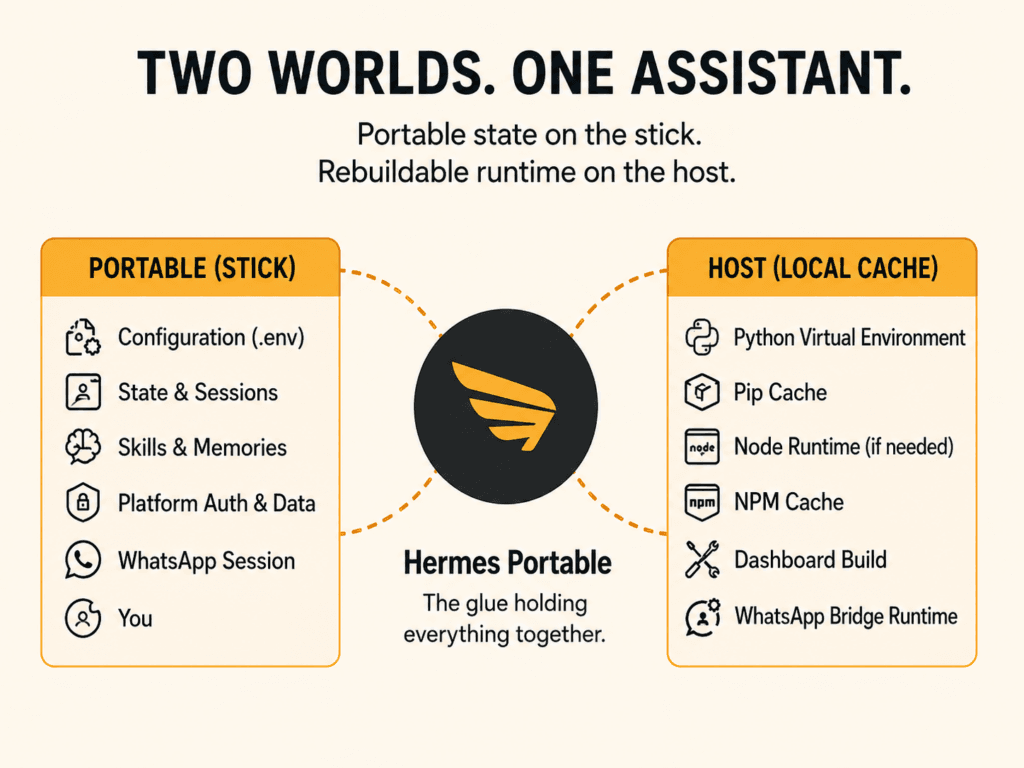
Hermes Portable works around this by splitting the world into two categories: durable portable state and disposable rebuildable runtime.
The portable state stays on the USB stick. This includes the .env file, configuration, state database, sessions, skills, memories, authentication data, and platform-specific session data such as WhatsApp pairing information.
The runtime machinery lives in a host-local cache. This includes the Python virtual environment, pip cache, Node runtime if needed, npm cache, WhatsApp bridge runtime, and dashboard build artifacts.
This matters because it means the USB stick contains the things you care about, not the fragile mess that can be regenerated. If the host-local runtime cache breaks, becomes outdated, or was built with the wrong Python version, Hermes Portable can rebuild it. If the USB stick breaks, that is where your actual data lived, so please do not treat it like a conference pen you got for free and immediately lost.
What Hermes Portable Actually Does
At its core, Hermes Portable is a wrapper.
You run it instead of manually preparing the entire Hermes Agent environment yourself. It detects a compatible Python installation, prepares or repairs the host-local runtime cache, prepares the portable gateway runtime, starts the Hermes gateway as a child process, launches the Hermes CLI, and shuts the gateway down again when Hermes exits.
That sounds boring.
Good.
Boring infrastructure is the best infrastructure. It means the wrapper is doing the fiddly things so I do not have to keep doing them manually like some kind of dependency butler.
On Linux and macOS, launching it can be as simple as:
./hermes-portableOn Windows, there are PowerShell and batch launchers as well, because portability that ignores Windows is not really portability. It is just Unix software wearing sunglasses.
There is also a doctor mode:
./hermes-portable --doctorThis checks whether the setup looks sane. It is the software equivalent of tapping the microphone and saying “is this thing on?” before blaming the room, the cable, the laptop, and finally DNS.
There is a repair mode too:
./hermes-portable --repair --doctorBecause sometimes software environments need therapy.
The wrapper also supports direct pass-through commands to Hermes, session resume, gateway-only mode, no-gateway mode, runtime reset, platform setup helpers, dashboard mode, and temporary-machine cleanup.
This is not a giant new AI framework. It is glue. But good glue is underrated. Half of modern computing is just convincing different pieces of software to stand close enough together that users do not notice the screaming.
The USB Stick as a Personal AI Key
One of the things I like about this setup is that it brings back a slightly old-school computing feeling.
There was a time when carrying your tools with you meant something physical. A floppy disk. A CD-R. A USB stick full of scripts, SSH keys, notes, configs, and small utilities with names like fixthing.sh, really_fixthing.sh, and final_fixthing_v2_ACTUAL.sh.
Today we pretend everything is better because it is in the cloud. Which often means “somebody else’s computer, behind somebody else’s dashboard, governed by somebody else’s terms of service, monetized by somebody else’s business model, and occasionally improved by somebody else’s exciting new outage.”
Hermes Portable is more in the “carry your own toolbox” tradition.
Imagine having your AI assistant setup with you. Not in a vague cloud-sync way. Not as a login session that may or may not remember what it was doing. But as an actual portable working environment with your configuration, state, sessions, skills, memories, and platform integrations.
Plug it into a machine. Run the wrapper. Continue working.
That is useful.
It is also slightly rebellious in the best possible way. Not because it is trying to overthrow anything, but because it refuses to accept that every useful tool must immediately become a hosted SaaS subscription with a mascot and a pricing page that says “Contact Sales” where the price should be.
Use Case: The Consultant USB Stick
One obvious use case is consulting work.
You may be moving between customer sites, lab machines, temporary workstations, and your own laptop. You want access to the same assistant setup, but you do not necessarily want to permanently install your entire environment everywhere.
With Hermes Portable, the USB stick becomes the thing you bring with you. The host machine provides compute and local runtime cache. The stick provides identity and state.
This makes sense in places where machines are semi-temporary. Labs. Test benches. Workshops. Customer offices. Conference rooms where the HDMI cable is always too short and someone has installed three versions of Python but none of them are the one you need.
In temporary-machine mode, Hermes Portable can remove the host-local runtime cache on exit. That is useful when you want to leave less behind. It does not magically erase the fact that you used the machine, and it is not a replacement for proper operational security, but it does clean up the rebuildable runtime pieces it created.
That is a pretty sane compromise. Keep your actual Hermes state on the portable drive. Use the host only for disposable runtime support. Clean up when you are done.
Use Case: The Lab Assistant
Another use case is the test lab.
This is the kind of environment where the machines are simultaneously critical and cursed. There is always a machine connected to some obscure device. It has a working setup from 2021 that nobody dares update. There is a Python installation that exists because one tool needed it once. There is a folder called new_new_backup_old. There are cables. So many cables.
In that kind of environment, installing another permanent toolchain is not always desirable.
Hermes Portable lets you carry a known assistant setup between machines without turning each one into a snowflake installation. The local cache can be rebuilt as needed. Your Hermes state remains with the portable project. If the lab machine is weird, Hermes Portable tries to adapt rather than assuming the universe is clean and well-maintained.
Which, let us be honest, is a bold assumption software makes far too often.
This could be useful for test notes, recurring workflows, command references, lab-specific skills, device interaction helpers, or just having the same assistant context available across the places where the work actually happens.
Not everything useful happens on the pristine developer workstation with the mechanical keyboard and the perfectly themed terminal.
Some of it happens on the slightly dusty Windows box under the desk that controls a device no one wants to reboot.
Use Case: The Conference Survival Kit
Conferences are another obvious place where portability matters.
You are away from your main machine. You are working from a laptop, a borrowed system, or some temporary environment. You need notes, scripts, chat integration, session history, maybe a dashboard, maybe some helper skills. You do not want to spend the first hour installing dependencies while everyone else is already talking about architecture diagrams and drinking bad coffee.
With Hermes Portable, the assistant comes with you.
This fits nicely into the “conference survival USB stick” concept. Alongside the VPN configs, SSH keys, emergency scripts, offline documentation, and a text file named wifi-passwords-this-time-really.txt, you can have a portable Hermes environment.
Of course, because this can contain API keys, messenger credentials, WhatsApp pairing data, chat history, memories, and other personal material, the USB stick should be treated like a password vault, not like a novelty keychain shaped like a rubber duck.
Encrypt it if practical. Back it up. Do not leave it in random machines. Do not lend it to people unless you also trust them with the digital equivalent of your house keys and browser history.
Portable does not mean harmless. Portable means easy to carry. That includes easy to lose.
Use Case: The “I Do Not Want SaaS for This” Setup
There is also a philosophical use case.
A lot of AI tooling is drifting toward the same pattern: accounts, hosted state, dashboards, central services, telemetry, subscriptions, and “enterprise readiness,” which usually means the software now requires two admin panels and a procurement person.
Hermes Portable goes in the other direction.
It is not anti-cloud in some performative bunker-dweller way. It simply makes a different tradeoff. It says: keep the personal assistant state close. Make it movable. Make it understandable. Let the host provide what can be rebuilt. Do not pretend the runtime junk is sacred. Do not pretend user state is disposable.
That is the part I really like.
The wrapper does not make Hermes magically independent from every external service. If you configure platforms or API-backed providers, those still exist. Reality remains annoyingly real. But it gives you a cleaner boundary between your portable assistant identity and the machines you happen to run it on.
That boundary is useful.
And in 2026, any tool that gives users clearer ownership over their own working environment deserves at least a small sarcastic salute.
Platform Integrations
Hermes Portable includes setup helpers for several platforms, including Telegram, Discord, Slack, Signal, and WhatsApp.
This is where things become especially interesting. A portable AI assistant is useful in the terminal. A portable assistant that can also connect to messaging platforms starts to become a small personal operations hub.
Telegram, Discord, Slack, and Signal share the portable Python gateway runtime. WhatsApp still uses a separate Node bridge runtime, because apparently no software stack is complete until JavaScript gets invited to the party wearing a fake mustache. The important part is that the WhatsApp session remains on the USB stick.
The wrapper also includes platform actions for setup, Slack manifest generation, WhatsApp pairing, and all-platform setup. That makes the portable project less of a pile of manual instructions and more of a real working tool.
The practical benefit is obvious: you can carry a configured assistant setup that knows how to talk to the platforms you use, without manually rebuilding all of that integration state from scratch every time.
The security warning is equally obvious: if you carry platform credentials around, you carry risk around. This is powerful, but it should be treated with respect. Or at least with the same level of paranoia you would apply to an SSH key, a password manager database, or a production database dump named backup-final.sql that definitely should not be on your desktop.
Dashboard Support
Hermes Portable also supports the upstream Hermes dashboard.
The wrapper can build the dashboard-capable assets into the host-local runtime cache rather than polluting the portable source tree. It can start the portable gateway child by default when launching the dashboard, and it opens the browser using the system-native opener instead of relying on Python’s sometimes charmingly optimistic browser detection.
By default, the dashboard binds to localhost.
This is a nice addition because it gives the project a friendlier operational mode. Terminal tools are wonderful, obviously. I am a terminal person. I like text interfaces. I like sharp tools. I like applications that start instantly and do not need 400 MB of Electron to render a checkbox.
But dashboards have their place. Sometimes you want a visual overview. Sometimes you want a local web interface. Sometimes you want to show something to another human being without first explaining why the blinking cursor is actually a productivity feature.
Hermes Portable does not force one interface style. It makes both the CLI and dashboard paths available in a portable-friendly way.
That feels right.
Updating Without Rebuilding Your Life
One thing I wanted Hermes Portable to handle cleanly is updates.
There are wrapper update commands for updating the wrapper repository itself, and there are commands for updating the vendored Hermes source to the latest upstream release or to a specific tag or branch.
The design is refreshingly practical: update the source, reset the host-local runtime cache, rebuild on next launch.
That is the correct attitude toward runtime caches. They are not pets. They are cattle. Disposable, rebuildable, and preferably not emotionally significant.
This is also why the separation between USB state and host cache matters so much. If updating the underlying runtime means dragging the user’s actual configuration and state through a dependency wood chipper, nobody is going to enjoy that. Hermes Portable tries to keep the valuable part separate from the replaceable part.
That is not glamorous engineering. It is just good engineering.
Which is often the same thing, only with fewer conference talks.
Security: The Part Where We Stop Joking Briefly
A Hermes Portable stick can contain sensitive material.
API keys. Messenger credentials. WhatsApp pairing data. Chat and session history. Memories. Skills. Configuration. Authentication files. Platform state.
That means it should be treated like a password vault.
Do not leave it plugged into random machines. Do not lend it to someone because they “just need to copy a file.” Do not keep the only copy in your backpack next to old receipts and a USB-C adapter you no longer remember buying.
Use disk encryption or a container-based encrypted volume if practical. Keep backups. Rotate credentials if the stick is lost or copied. Be boring and careful.
Portable tools are great because they reduce friction. Unfortunately, reduced friction also applies to losing them, copying them, or accidentally leaving them in a hotel conference room where the next person will find a tiny plastic rectangle full of regret.
This is not a Hermes Portable-specific problem. It is the nature of portable identity. If you carry the keys, protect the keys.
The project does not remove that responsibility. It makes the responsibility more visible.
And honestly, that is better than pretending sensitive state becomes safe just because it is hidden somewhere inside a profile directory called .config.
Why I Built It
I built Hermes Portable because I like tools that move with me.
I like local-first software. I like systems where I can see what is happening. I like being able to rebuild disposable parts and preserve important state. I like projects that make computers feel a little more like personal machines again, rather than rented glass terminals into somebody else’s business model.
Also, I enjoy removing friction.
A lot of software gets abandoned not because the idea is bad, but because using it involves too much ritual. If a tool requires you to remember thirteen setup steps, two environment variables, a Python version constraint, a gateway process, a dashboard build, and the correct incantation to appease Node, then eventually you stop using the tool.
Not because it failed technically.
Because it became annoying.
Hermes Portable exists to make Hermes Agent less annoying to carry around. That is the whole pitch. No grand manifesto required, although obviously I am physically incapable of not writing one anyway.
Looking Ahead
There are a bunch of directions this project could go.
A more polished first-run experience would be useful. The current setup already includes helper commands and doctor checks, but a guided onboarding flow could make it easier to prepare a fresh portable environment without needing to understand every moving part upfront.
Better encryption integration is another obvious idea. Right now the advice is to use disk or container encryption if practical. A future version could perhaps make encrypted portable data workflows more convenient, or at least document a few recommended patterns for Linux, macOS, and Windows. The danger, of course, is building half a password manager by accident, which is how innocent projects end up wearing a trench coat and muttering about key derivation functions at parties.
Another idea is better profile support. One portable Hermes setup is useful. Multiple profiles could be even more useful. Work profile. Personal profile. Lab profile. Conference profile. Slightly unhinged weekend experiment profile. Each with its own configuration and state, but managed cleanly from the same portable wrapper.
There is also room for better host detection and diagnostics. The more machines this runs on, the more weird edge cases will appear (Like the guy running my Mastui app on a retro Apple computer from the early 90es). That is just nature. Every old workstation is an ecosystem. Every corporate laptop is a policy museum. Every random Windows install has at least one cursed path containing spaces, Unicode, and a vendor security agent that deeply disapproves of joy.
Improved backup and export helpers could also be useful. Since the portable data is the valuable part, making it easier to back up, snapshot, verify, or migrate would be sensible. Not flashy, but sensible. Which is usually where the best features live.
And then there is the dream of making the whole thing feel even more like a proper portable application. Better launchers. Friendlier status output. Maybe packaged releases. Maybe a cleaner visual identity. Maybe more ASCII art, because obviously nothing says “professional-grade portable AI wrapper” like a startup banner that looks like it escaped from a 1993 BBS.
Final Thoughts
Hermes Portable is not trying to reinvent Hermes Agent.
It is trying to make Hermes Agent easier to carry.
That distinction matters. This is a wrapper, a portability layer, and a practical piece of glue for people who want their assistant setup to move between machines without dragging around fragile runtime garbage or manually rebuilding the same environment over and over again.
It keeps the important things portable. It keeps the disposable things disposable. It acknowledges that modern software stacks are messy and works with that reality instead of pretending every machine is a clean developer utopia with the correct version of everything already installed.
It is small. It is useful. It is slightly opinionated. It exists because I wanted it to exist.
Which, frankly, is still one of the best reasons to build software.
If you want to take Hermes Agent with you on a USB stick, external drive, or other portable storage device, have a look at Hermes Portable:
https://github.com/kimusan/Hermes-Portable
Just remember: if your AI assistant now fits in your pocket, so do the secrets it knows.
Treat the stick accordingly.